Written by: Igor
Published: December 2025
Pushing a simple app to a single server is a thing of the past. Today, the deployment of applications is a complex puzzle scattered across public clouds, on-premise data centers, and the growing network of edge devices. This isn't just a technical headache for your engineering team-it's a strategic reality you must master to scale a modern business. This guide will show you how to choose the right architecture, build a production-ready pipeline, and deploy code with confidence.
Snapshot: Key takeaways
- Multi-cloud is the new normal: 98% of enterprises use at least one public cloud (Statista). A hybrid strategy isn't a trend; it's a competitive necessity for cost, performance, and compliance.
- Architecture dictates everything: Your choice between Kubernetes, serverless, or a hybrid model directly impacts your budget, team skills, and speed. Match the architecture to your product, not the other way around.
- Automation is your biggest lever: A robust CI/CD pipeline is an automated assembly line for your code. It removes human error and frees up engineers to solve customer problems, not fight deployment fires.
- Deploy smart, not fast: Use strategies like blue-green deployments or canary releases to roll out new features with minimal risk. Decoupling code deployment from feature release is a sign of a mature team.
Rethinking application deployment in a multi-cloud world
The modern deployment landscape isn't a simple choice between your server rack and a single cloud provider. It’s a dynamic blend of environments, each picked for a specific reason-cost, raw performance, or strict compliance.
This is the new normal. A 2023 report from Flexera found that 89% of organizations have a multi-cloud strategy. The typical organization uses multiple public and private clouds, often moving apps from public clouds back to on-premise locations to get a better handle on costs and performance.
This complexity creates both massive challenges and huge opportunities. For founders, getting your head around this new playing field is critical.
The business case for a modern deployment strategy
A well-designed deployment strategy directly impacts your bottom line. It's not just about shipping code faster; it's about engineering a delivery engine that is resilient, efficient, and secure.
Here’s what that looks like in business terms:
- Serious cost optimization: A multi-cloud or hybrid setup lets you run workloads where they are most cost-effective. You can keep stable jobs on-prem while tapping into the cloud's elasticity for variable traffic.
- Better performance and resilience: Spreading your application across the globe cuts down latency. It also creates rock-solid availability. If one provider has an outage, you can failover to another.
- Tighter security and compliance: This model allows you to meet tough data sovereignty rules by keeping sensitive data in specific locations, all while using cloud services for everything else.
To nail deployment in this multi-cloud world, you must embrace a strategy centered on cloud native application development. It’s the only way to build applications designed to thrive in these distributed environments.
Key concepts in business terms
You must translate technical jargon into business value. Core concepts like containerization with Docker, orchestration with Kubernetes, and Infrastructure as Code (IaC) are the building blocks of this new reality.
Don't think of them as abstract technologies. Think of them as tools that make your application deployment predictable, repeatable, and ready to scale.
Choosing your deployment architecture
Your deployment architecture is the bedrock of your delivery speed and reliability. Getting this choice right today saves you from a mountain of technical debt tomorrow. This isn't just a technical decision; it's a strategic one.
The goal is to align your architecture with your product roadmap. Let's cut through the hype around the three dominant models: Kubernetes, serverless, and hybrid.
When to choose kubernetes
Kubernetes (K8s) is the powerhouse of the cloud-native world. Think of it as the operating system for your cloud infrastructure, designed to automate the deployment, scaling, and management of containerized applications. It excels at managing complex applications with many moving parts.
Its real strength is control. K8s gives your team granular power over every aspect of the application lifecycle. This makes it a go-to for businesses that require high availability and sophisticated service orchestration.
However, this power comes with a steep operational cost. Managing a Kubernetes cluster requires specialized expertise. According to a 2023 report from the Cloud Native Computing Foundation, over 50% of organizations cite complexity and a lack of in-house skills as major barriers to Kubernetes adoption. You are committing to managing an entire ecosystem.
alt text: A diagram showing the Kubernetes architecture with a control plane and worker nodes.
When to go serverless
Serverless computing, powered by platforms like AWS Lambda or Google Cloud Functions, is a fundamental shift. Instead of managing servers, you focus on your code. The cloud provider handles all the underlying infrastructure.
The primary business driver here is cost-efficiency. You only pay for the compute time you use. This makes it a perfect fit for event-driven applications or workloads with unpredictable traffic. A classic use case is an image processing function that runs when a user uploads a photo.
The trade-off? A loss of control and the risk of vendor lock-in. Serverless functions have execution time limits and environmental constraints. They’re less suitable for long-running, stateful applications. Digging into the trade-offs of different application development models is key.
When a hybrid model makes sense
A hybrid architecture isn't about choosing one model. It's about blending them to get the best of all worlds. This pragmatic approach combines on-premise infrastructure with public cloud services.
Why do this? The main drivers are usually compliance, data sovereignty, and legacy systems. Many industries, like finance or healthcare, have strict regulations requiring sensitive data to remain on private servers. A hybrid model lets you keep your databases on-premise while using the public cloud's elastic compute resources.
It's also a practical way to modernize. A hybrid strategy provides a bridge, letting you gradually migrate parts of a legacy application to the cloud without a risky, all-or-nothing cutover.
Deployment architecture comparison
To make this choice clearer, here is a breakdown of the key differences. Think of this as a cheat sheet for aligning a technical strategy with business goals.
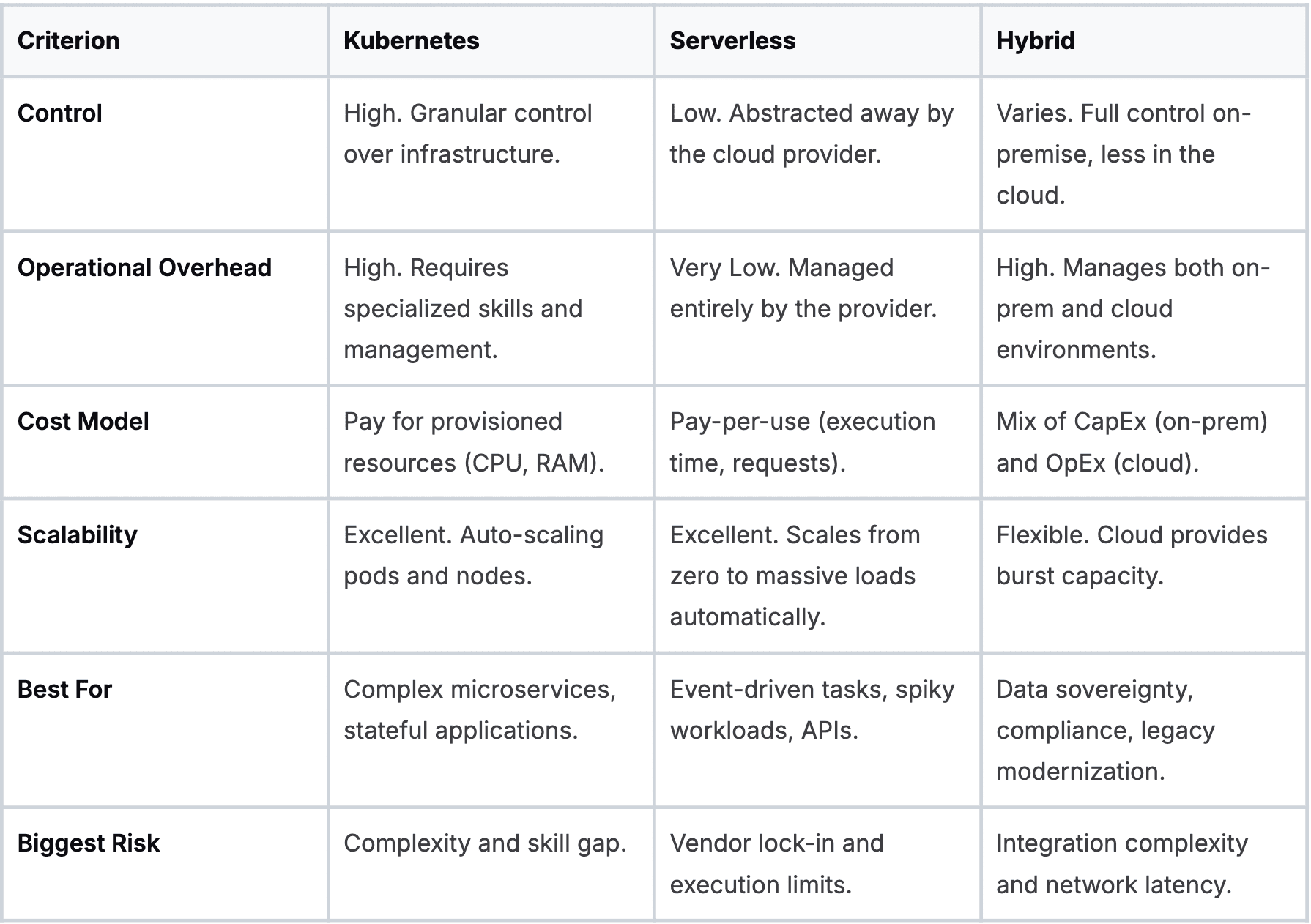
Ultimately, there is no single "best" architecture. The right choice depends on your application's requirements, your team's skills, and your long-term business strategy.
Building your production-ready CI/CD pipeline
A Continuous Integration/Continuous Deployment (CI/CD) pipeline is the automated assembly line for your software. It’s the engine that reliably takes code from a developer’s laptop to a live application. Without a solid pipeline, the deployment of applications becomes a manual slog that kills momentum.
Putting this engine together is more than connecting tools. It’s about creating a repeatable workflow that can build, test, and release code with almost zero human touch. That automation is a massive competitive edge.
The architecture you choose shapes how your CI/CD pipeline is built. Your pipeline must be built for the reality of your chosen architecture, not a generic template.
The core stages of an effective pipeline
A real-world CI/CD pipeline is a series of automated quality gates. Every stage must pass before the code can move on.
- Source stage: It all starts here. The pipeline kicks off automatically when a developer pushes code to a version control system like Git.
- Build stage: The pipeline grabs the latest code and compiles it into a runnable artifact, like a Docker image.
- Test stage: This is the most important part. The artifact is put through a gauntlet of automated tests-unit tests, integration tests, and end-to-end tests.
- Deploy stage: Once all tests pass, the artifact is deployed to a staging environment that mirrors production. It’s your last chance to catch issues before they hit users.
To really nail this, dig into the Top 10 CI/CD Pipeline Best Practices for a deeper dive.
Weaving security in from the start
In modern engineering, security isn't bolted on at the end. The practice of DevSecOps embeds security checks right into your automated pipeline.
This means adding dedicated stages for:
- Static Application Security Testing (SAST): Scans your raw source code for known vulnerabilities.
- Software Composition Analysis (SCA): Inspects your third-party libraries for security holes.
- Dynamic Application Security Testing (DAST): Probes the running application in your staging environment for runtime vulnerabilities.
This "shift-left" strategy catches security flaws early when they are cheaper to fix. When building sophisticated AI systems, the right tooling is everything. Our guide on the best MLOps platforms breaks down tools with robust CI/CD features baked in.
Don't forget to monitor the pipeline itself
Your CI/CD pipeline is critical infrastructure. If it goes down, your ability to release code grinds to a halt. You must treat it like a production service, which means observability.
You need to track key pipeline metrics:
- Build duration: Are builds getting longer? This can be a sign of technical debt.
- Test failure rate: If this climbs, it could mean flaky tests or slipping code quality.
- Deployment frequency: This is a core metric for team velocity. How often are you successfully shipping code?
The market for application performance monitoring is expected to reach nearly $13 billion by 2026, according to a report by MarketsandMarkets. This massive investment shows just how critical tooling is for managing the entire application lifecycle.
Using smart deployment strategies to reduce risk
Every time you push new code to production, you're rolling the dice. A smart deployment strategy isn't about eliminating risk entirely. It's about actively managing it to protect your users and your bottom line.
Modern release techniques are your safety net. They let you roll out new features to a small slice of users, see how things perform, and pull it back quickly if something breaks.
The power of blue-green deployments
A blue-green deployment is a clean and effective way to de-risk a release. You run two identical production environments, "blue" and "green."
Imagine your live traffic is hitting the blue environment. You deploy a new version to the green environment, which is isolated from users. Here, you can run a full suite of automated tests.
Once you're satisfied the new version is solid, you flip a switch at the router level, directing all traffic from blue to green. The switch is instantaneous. If issues crop up, rolling back is just as fast-flip the router back to blue. This strategy eliminates downtime.
Canary releases for gradual rollouts
A canary release is more cautious and data-driven. Instead of flipping all traffic at once, you release the new version to a tiny fraction of your users-the "canaries." This might be just 1% or 5% of your traffic.
You then watch key performance indicators (KPIs) like a hawk. Are error rates climbing? Is latency spiking? If metrics look healthy, you gradually increase traffic to the new version, maybe from 5% to 25%, then 50%, and finally 100%.
If metrics take a nosedive, you can immediately roll back. This limits the "blast radius" of a bad release. This only works if you have robust monitoring and good software for risk analysis.
Feature flags for ultimate control
Feature flags (or feature toggles) decouple code deployment from feature release. A feature flag is an on/off switch in your code that lets you enable or disable a feature without deploying new code.
This unlocks fine-grained control. You can:
- Release a feature to internal teams only.
- Enable a feature for a specific beta group.
- Quickly kill a problematic feature without a full rollback.
This approach dramatically lowers the risk of each deployment because new code can be pushed to production in a disabled state.
Checklist: Pre-deployment risk mitigation
- Code review complete: Has the code been reviewed by at least one other engineer?
- CI passed: Have all automated build and unit tests passed successfully?
- Staging deployed: Is the new version running in a production-like staging environment?
- End-to-end tests green: Have automated end-to-end tests passed against the staging environment?
- Monitoring dashboard ready: Is your monitoring dashboard configured to track the new feature's key metrics?
- Rollback plan documented: Is the plan to revert the change clear and tested?
Mastering post-deployment monitoring and optimization
Pushing your code live isn't the finish line. It's the starting gun. The second your application is out in the wild, the real work of monitoring, securing, and optimizing begins. A successful deployment of applications is one that gets smarter based on real-world feedback.
This post-deployment cycle is about creating a continuous feedback loop. You're constantly learning what’s working and what’s not, then feeding those insights back into development.
The three pillars of observability
To understand what your application is doing in production, you need observability. It is built on three core types of data that tell the complete story.
- Logs: These are detailed, time-stamped records of every event. A log tells you what happened, like "User X failed to log in."
- Metrics: These are the numbers-quantitative measurements over time. Metrics show you the symptoms of a problem, like "CPU utilization is at 95%."
- Traces: Traces follow a single request as it weaves through all the different services in your application. A trace shows the entire journey, helping you pinpoint bottlenecks.
When you bring these pillars together, you stop just monitoring for problems you know about. You gain the power to understand the "unknown unknowns."
Cutting through the alert noise
One of the biggest traps is setting up too many alerts. When everything is an emergency, nothing is. The goal isn't to get more alerts; it's to get meaningful, actionable alerts that signal real user impact.
A good alert demands human intervention. Instead of a ping for high CPU, you should be alerted to things that hit the user experience, like a spike in the 5xx server error rate or an increase in page load times. Focusing on user-centric metrics keeps your team focused on what matters.
A platform like Datadog is a great example of how different metrics can be visualized to track application health.

You can see how metrics like request volume and latency are tracked alongside error rates, giving you a complete view of performance.
Runtime security and compliance
Security work doesn't stop once the code is shipped. The production environment is a hostile place. You need eyes on it constantly. This is where runtime security monitoring comes in. These tools actively watch for weird behavior in your live application.
Managing secrets like API keys and database credentials is another massive post-deployment task. Hardcoding secrets is a recipe for disaster. Use a dedicated secrets management tool like AWS Secrets Manager or HashiCorp Vault. These tools let you centrally manage, rotate, and audit access to your most sensitive credentials.
Taming your cloud bill
A huge part of post-deployment optimization is keeping costs in check. Cloud bills can spiral out of control. The key is to dig into your usage patterns and right-size your infrastructure to match demand.
Are you paying for massive servers that are only hitting 10% of their CPU? Could you shift certain workloads to spot instances and save up to 90%? Are there forgotten resources that can be shut down? Answering these questions can lead to big savings.
Wrap-up
Mastering the deployment of applications is no longer optional-it's a core business function. It determines how quickly you can innovate, how resilient your service is, and ultimately, how competitive you can be. Your next step is to assess your current CI/CD pipeline. Identify the single biggest manual bottleneck and automate it. That first step will build the momentum you need to create a truly modern delivery engine.
We at N² labs can help you move your AI initiatives from a promising pilot to a production-grade reality. We offer independent AI readiness assessments, build a prioritized roadmap, and provide the hands-on delivery needed to ship measurable AI workflows with the right monitoring, KPIs, and guardrails.
Find out how we can help at https://www.n2labs.ai.
FAQ
Get your code into a centralized version control system like Git and start automating your build process. You can’t have continuous deployment without continuous integration. This one move eliminates a massive source of human error and creates the bedrock for everything else you will automate.
It boils down to your application's architecture and your team's operational capacity. Go with Kubernetes if you are building a complex application with many microservices and need granular control. Opt for a serverless approach like AWS Lambda if your application is event-driven or has unpredictable traffic, and you want to minimize infrastructure management.
People often confuse these terms. Continuous delivery means your code is always in a deployable state, having passed all automated tests, but a human must manually trigger the release to production. Continuous deployment automates that final step, pushing any code that passes tests directly to production without human intervention. This distinction is critical for understanding modern strategies for the deployment of applications.
Application deployment tools are software solutions that automate the process of releasing an application to its target environments. This includes tools for version control (like Git), containerization (like Docker), orchestration (like Kubernetes), and CI/CD platforms (like Jenkins or GitLab CI), all of which streamline the modern deployment of applications.