Written by: Igor
Published: December 2025
For most founders, the HR function is a ticking time bomb. It starts small, but before you know it, it's buried in repetitive tasks that become a major bottleneck. Answering the same benefits questions over and over, screening resumes, and walking new hires through the basics-these are manual drags that slow down hiring and pull everyone away from the work that actually matters. This is where chatbots in HR come in. Think of them as AI assistants that work 24/7, creating efficiencies that show up directly on your bottom line. This guide will show you how to implement them to save time, cut costs, and improve your employee experience.
Snapshot: key takeaways
- Solve the right problem: Focus your first chatbot on a high-volume, low-complexity task like answering paid time off (PTO) questions to get a quick win.
- Prioritize integrations: A chatbot is only as good as the systems it connects to. Ensure it integrates seamlessly with your core HRIS and other tools.
- Measure what matters: Track metrics like resolution rate and user satisfaction to prove ROI and find areas for improvement.
- Promote adoption: Give your bot a name and a clear launch plan. If people don't know it exists or what it does, they won't use it.
- Iterate constantly: A chatbot is not a "set it and forget it" project. Use analytics to find knowledge gaps and refine it over time.
Why chatbots in HR are a growth engine, not a gadget
Your team is stretched thin. Every minute they spend answering a routine question about paid time off (PTO) is a minute they aren't spending on strategic initiatives like building an amazing company culture or developing your top talent. This isn't just a minor inconvenience; it's a direct brake on your company's growth.
Manual HR processes create friction, frustrate employees with slow answers, and stop your HR team from thinking bigger.
The problem just gets worse as you scale. More employees mean more questions, more paperwork, and a heavier administrative load. This is the point where an HR chatbot shifts from a "nice-to-have" gadget to an absolutely essential growth engine. They aren't here to replace your people; they're here to supercharge them.
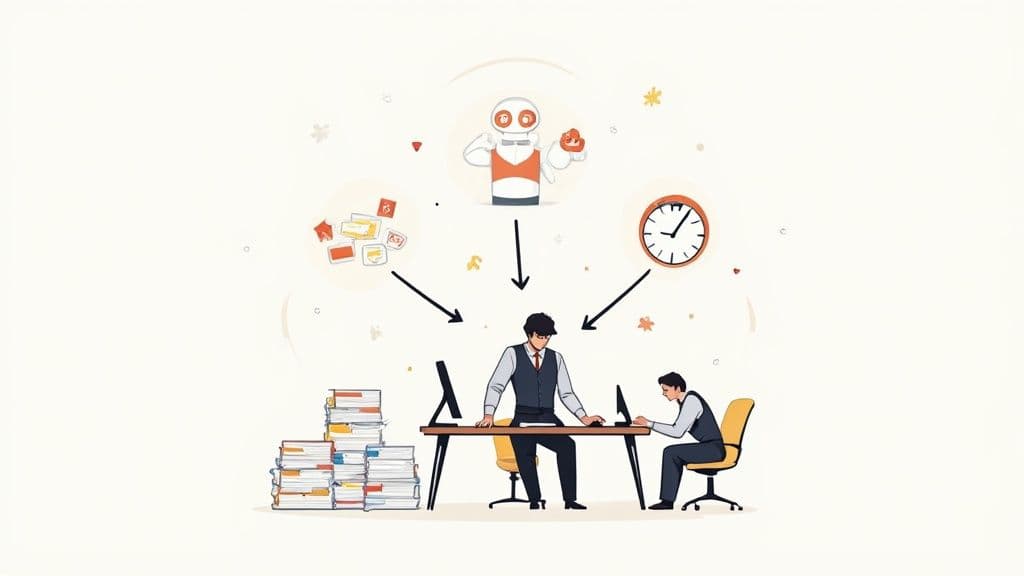
From manual overload to automated efficiency
Picture an HR chatbot as your company’s first line of defense for all the common stuff. It’s an automated system built to handle the high-volume, low-complexity tasks that eat up so much of your HR team's day.
Here’s what that actually looks like:
- Instant answers, 24/7: Employees get immediate responses to questions about benefits, payroll, and company policies. No more waiting for an HR generalist to dig through their inbox.
- Smoother onboarding: New hires get guided through paperwork, introduced to company tools, and have their first-day questions answered automatically. It’s a better experience for them and less work for you.
- Faster recruiting: Chatbots can pre-screen candidates with initial questions, help schedule interviews, and keep applicants in the loop, shrinking your time-to-hire.
This kind of automation has a real, measurable impact. According to Gartner, organizations can cut HR support costs by nearly 30% by automating common questions. We're seeing organizations slash contract processing time and save thousands of human work hours a year by letting bots handle routine queries.
The strategic shift for founders
When you offload all the repetitive work, you free up your HR professionals to focus on the things that truly drive value. Instead of being reactive administrators putting out fires, they become proactive partners in your company’s growth. You can get a sense of this evolution by looking at the insights from ChatGPT on employee internal communication.
This strategic shift lets your team concentrate on what’s important:
- Developing leadership training programs.
- Improving employee retention strategies.
- Conducting meaningful performance reviews.
- Building a culture that attracts and keeps top talent.
At the end of the day, putting an HR chatbot in place is a strategic move to build a more agile, responsive, and scalable company. It’s about letting technology handle the predictable stuff, so your people can manage the exceptional.
The strategic impact of automating your HR workflows
Bringing a chatbot into your HR department is about more than just clawing back a few hours in the day. It delivers a real, measurable return on investment (ROI). While giving your team more breathing room is an obvious win, the true value shows up in three key places: direct cost reduction, a seriously better employee experience, and supercharged recruiting.
Ultimately, it’s about shifting your team's focus from drowning in repetitive admin to driving strategic growth. You're not just doing the same work faster; you're fundamentally changing how HR operates. Instead of being stuck in a reactive, ticket-based grind, you create a proactive, self-service culture where employees feel empowered and your HR pros can finally tackle high-impact work. To get the bigger picture, you can explore proven strategies for HR process automation to transform your workplace.
Driving down operational costs
One of the first things you'll notice is a big drop in operational costs. Think about it: a huge chunk of your HR team's day is spent answering the same handful of questions. "When is payday?" "How do I enroll in benefits?" "Where's the PTO policy?" Every single one of those interactions has a cost attached.
An HR chatbot acts like a Tier 1 support agent that’s on the clock 24/7 and never needs a coffee break. This immediately cuts down the flood of tickets and emails hitting your human team. Industry data shows that companies can slash their HR support costs by nearly 30% just by automating these common questions.
This isn't about getting rid of people. It's about optimizing your headcount. As your company scales, you can handle a growing workforce without having to hire a proportional number of new HR generalists. That lean approach keeps your overhead in check and frees up capital you can pour into other parts of the business.
Boosting employee experience and satisfaction
Let's be honest, a slow and confusing HR process is a huge source of frustration for employees. When someone has to wait hours-or even days-for an answer about their health benefits or PTO balance, it creates needless friction and kills morale. This is where a chatbot really shines.
It offers instant, on-demand information. An employee can ask a question at 10 PM on a Sunday night and get an accurate answer right away. That kind of responsiveness makes people feel heard and supported.
A great employee experience has a direct line to retention and productivity. Happy, supported employees are far more engaged and much less likely to start browsing LinkedIn for other jobs. The self-service model empowers them to find what they need on their own terms, which is exactly how most people prefer to work anyway.
Accelerating your recruiting cycle
In a tight talent market, speed is your secret weapon. A slow, clunky hiring process is the fastest way to lose out on top candidates who have other offers on the table. HR chatbots can put your entire recruiting workflow into a higher gear, from the first point of contact all the way to scheduling the final interview.
Here’s how it builds a much more efficient hiring machine:
- 24/7 candidate engagement: A bot on your careers page can chat with applicants anytime, answering questions about the role or company culture long after your recruiters have logged off for the day.
- Automated screening: It can ask the initial knockout questions to filter for basic qualifications, making sure your recruiters' time is spent only on the most promising candidates.
- Instant interview scheduling: By connecting to your team's calendars, the chatbot can find and book interview slots automatically. No more painful back-and-forth emails that drag out the process for days.
This kind of automation shrinks your time-to-hire, lowers your cost-per-hire, and creates a slick, modern experience for candidates. It makes sure no one falls through the cracks and keeps your pipeline constantly moving, giving you a serious edge in the war for talent.
How to deploy chatbots across the employee lifecycle
The real magic of HR chatbots isn’t just having one; it’s about strategically placing them at key moments in an employee's journey with your company. Think of them less as a single, catch-all tool and more like specialized assistants that pop up exactly when needed to smooth out friction, from the first interview to the last day.
By automating the predictable, high-volume tasks at each stage, you create a consistent, supportive experience for employees. More importantly, it frees up your HR team to focus on the human stuff-the conversations and strategies that truly matter. This approach creates a powerful ripple effect across the entire organization.
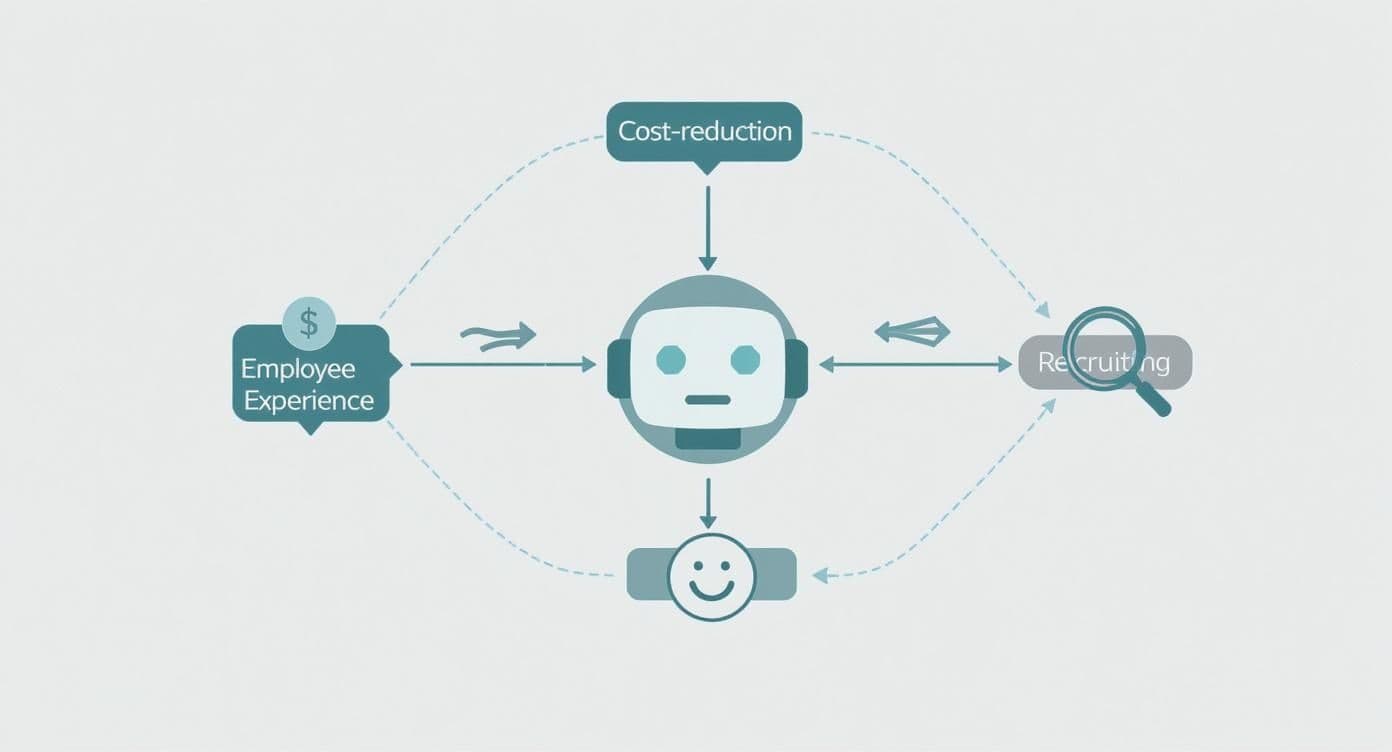
As you can see, the impact isn't isolated. Better recruiting leads to a better employee experience, which in turn reduces costs and boosts satisfaction. It's all connected.
Recruiting and screening
In recruiting, speed is the name of the game. A great candidate won’t wait around. A chatbot on your careers page can engage potential applicants 24/7, instantly answering their questions about company culture, benefits, or specific role details. That immediate connection can be the difference between them applying or clicking away to a competitor.
But it's not just about answering questions. A recruitment chatbot can also handle the first pass of screening. It can ask basic qualifying questions-things like years of experience, location, and salary expectations-to build a shortlist of the best-fit applicants for your human recruiters.
- Before: Recruiters are buried in hundreds of applications, many from unqualified candidates. They spend hours playing email tag just to schedule a single phone screen.
- After: The chatbot acts as a filter, presenting a curated list of qualified people. It then syncs with recruiters' calendars and schedules interviews automatically, dramatically cutting down the time-to-hire.
The data backs this up. Companies using chatbots on their career sites have seen significant increases in completed job applications. You can dig into more of these powerful recruitment chatbot statistics on masterofcode.com.
New hire onboarding
The first few weeks at a new job are a whirlwind of information and anxiety. A well-built onboarding chatbot acts like a personal guide, helping new hires navigate everything from payroll forms to IT system setups. It’s their go-to for all those "stupid" questions they're afraid to ask.
Instead of your HR team answering the same questions about direct deposit or VPN access over and over, the chatbot offers instant, step-by-step instructions.
Example workflow: Onboarding
Chatbot: "Welcome to the team, [New Hire Name]! I'm here to help you get started. First up, let's complete your payroll forms. Are you ready to begin?"
New Hire: "Yes"
Chatbot: "Great! I've just sent the I-9 and W-4 forms to your email. Once you've filled them out, you can upload them right here in this chat. Just let me know when you're done!"
This simple, guided interaction not only saves everyone time but also ensures every new employee gets the same smooth, supportive start.
Employee self-service
For your current team, an HR chatbot becomes the front door for everyday questions and requests. This is where you’ll see the most significant drop in your HR team's administrative burden. By connecting directly to your Human Resources Information System (HRIS) like Workday or SAP SuccessFactors, the bot can provide personalized answers on the spot.
This is where you move beyond simple FAQs and into true automation. As we cover in our guide to AI agents for HR, these bots can handle complex, multi-step tasks that once required a human.
Here's a quick look at how this changes things:
Manual vs chatbot-automated HR tasks
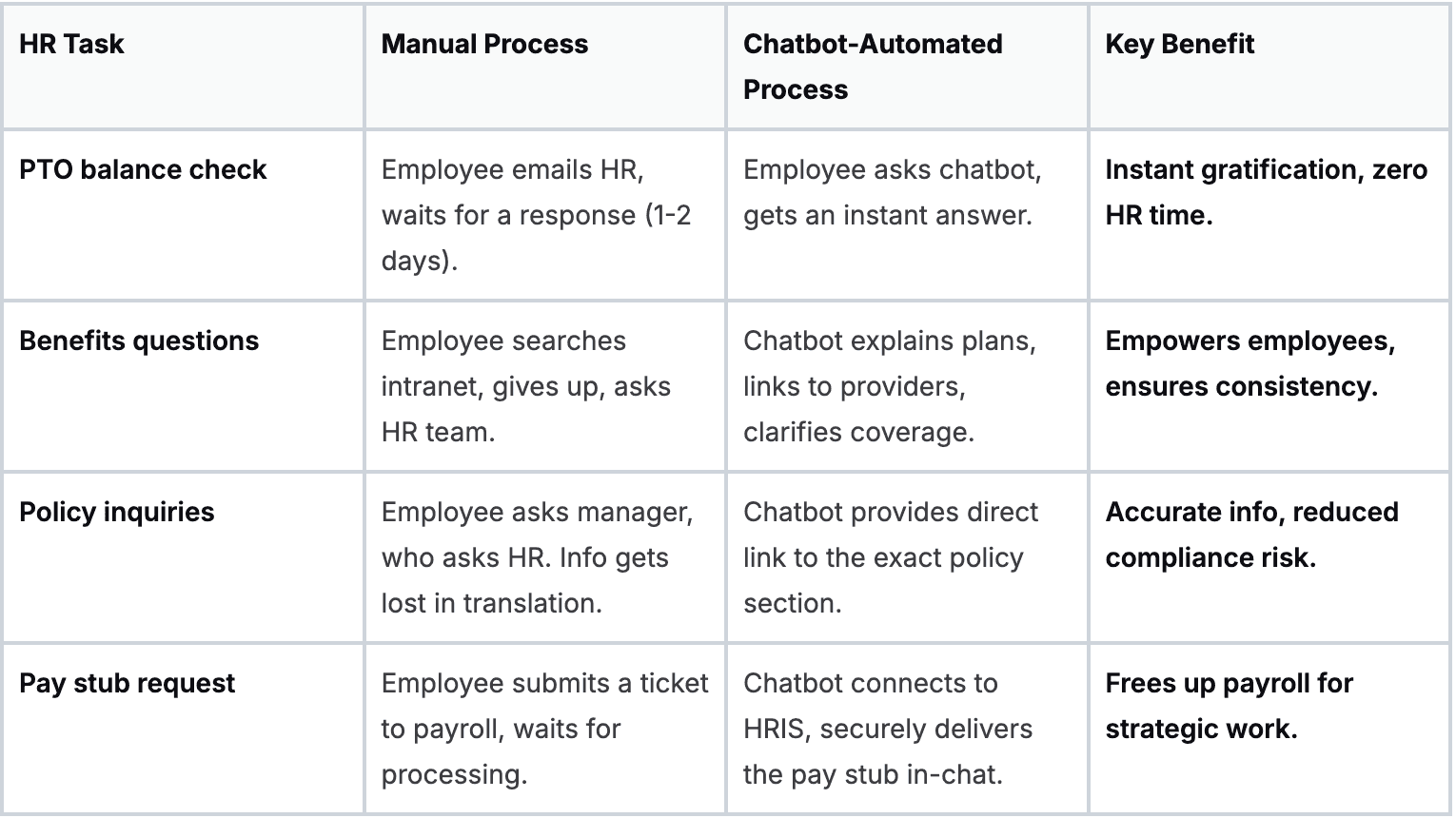
Giving employees this kind of instant access empowers them to find what they need and lets your HR professionals focus on the complex, strategic issues that truly require their expertise.
Learning and development
A chatbot can also be a powerful ally in building a culture of continuous learning. An L&D chatbot can act as a personalized training coach, recommending courses or articles based on an employee's role, stated career goals, or even recent performance feedback.
It handles the logistics, too-enrolling people in sessions, sending reminders, and collecting feedback afterward. This makes professional growth feel less like a chore and more like an accessible, engaging part of the job.
Offboarding
A graceful exit is just as important as a warm welcome. A smooth offboarding process protects your company's reputation and provides valuable feedback. A chatbot can automate the tedious logistics when an employee resigns.
The bot can generate a personalized offboarding checklist, guiding the departing employee through returning company gear, completing final paperwork, and transferring knowledge. It can also administer the initial exit survey, gathering honest feedback in a neutral, consistent format. This frees up your HR team to handle the more sensitive, face-to-face parts of the exit interview.
Choosing your path: build vs. buy
Once you’re sold on bringing an HR chatbot into the fold, you hit the first major fork in the road: do you build it from scratch or buy a solution that’s already on the market? This decision is a big one. It fundamentally shapes your budget, timeline, and how you’ll manage the system long-term.
There’s no universally correct answer here. It all comes down to your company's resources, in-house technical chops, and exactly what you need the bot to do.
Building a custom chatbot gives you ultimate control. You can design every single feature, conversation flow, and integration to fit your HR workflows like a glove. But this path demands a serious upfront investment in engineering talent, time, and, of course, money. And it's not a one-time project; you're also signing up for all the ongoing maintenance, updates, and security patches.
On the other hand, buying an off-the-shelf platform is the faster, more direct route. You can get a sophisticated, pre-built chatbot up and running in a matter of weeks, not months. The trade-off? Flexibility. While most vendors offer plenty of customization, you're still playing in their sandbox, which might not perfectly match every nuance of your processes.
Evaluating third-party vendors
For most founders and operators, buying is the practical choice. It lets you tap into a specialized product that has already ironed out the common kinks, freeing up your team to focus on what they do best-running your business.
But choosing the right vendor is absolutely critical. A poor fit can lead to low employee adoption, a frustrated HR team, and a completely wasted investment.
To make a smart decision, you need a clear framework for evaluation. Before you even start watching demos, it’s a good idea to look inward and get a handle on where you currently stand. Our guide on conducting an AI readiness assessment can help you map out your existing systems and pinpoint your most urgent needs.
Once you have that internal clarity, you can use this checklist to vet potential partners and make sure they’re truly aligned with your goals.
Vendor evaluation checklist
- Integration capabilities: This is where the rubber meets the road. The chatbot must connect seamlessly with your core HR systems. Ask vendors for specific examples of integrations with your Human Resources Information System (HRIS) and Applicant Tracking System (ATS). Does it support single sign-on (SSO) for frictionless employee access?
- Security and compliance: This one is non-negotiable. The vendor has to demonstrate rock-solid security practices. Look for certifications like SOC 2 and clear compliance with data privacy laws like GDPR. Make them walk you through their data encryption and access control policies in detail.
- Natural language processing (NLP) sophistication: A chatbot is only as good as its brain. Can it actually understand what people are asking? During a demo, throw it some curveballs-use slang, make typos, and ask complex, multi-part questions. You need to see if it can grasp context and intent, or if it's just a glorified keyword-matcher.
- Ease of use for HR admins: Your HR team will be in the driver's seat. The platform should have an intuitive, no-code interface that lets non-technical users build and tweak conversation flows, update information, and check performance dashboards without needing an engineering degree.
- Scalability and performance: Will this solution grow with you, or will it buckle under pressure? Talk to them about the platform’s ability to handle an increasing volume of users and questions without slowing down. Ask about its architecture and uptime guarantees.
- Pricing model: Get a complete picture of the cost structure. Is it a flat subscription fee, or is it based on the number of users or interactions? Watch out for hidden costs related to implementation, support, or adding more integrations down the line.
By working through these points systematically, you can cut through the sales pitches and marketing fluff to find a partner that will deliver real, lasting value.
Your first HR chatbot in four weeks
Putting a plan into action can feel like a huge leap, but launching your first HR chatbot doesn't have to be a six-month ordeal. You can go from idea to a live, helpful tool in a focused, four-week sprint. This roadmap breaks it all down into manageable weekly chunks, making a successful launch feel much less intimidating.
The key here isn't to build a bot that does everything. It's to pick one high-impact problem, solve it really well, and get a quick win on the board. A phased approach like this builds trust and gets people excited to actually use the thing.
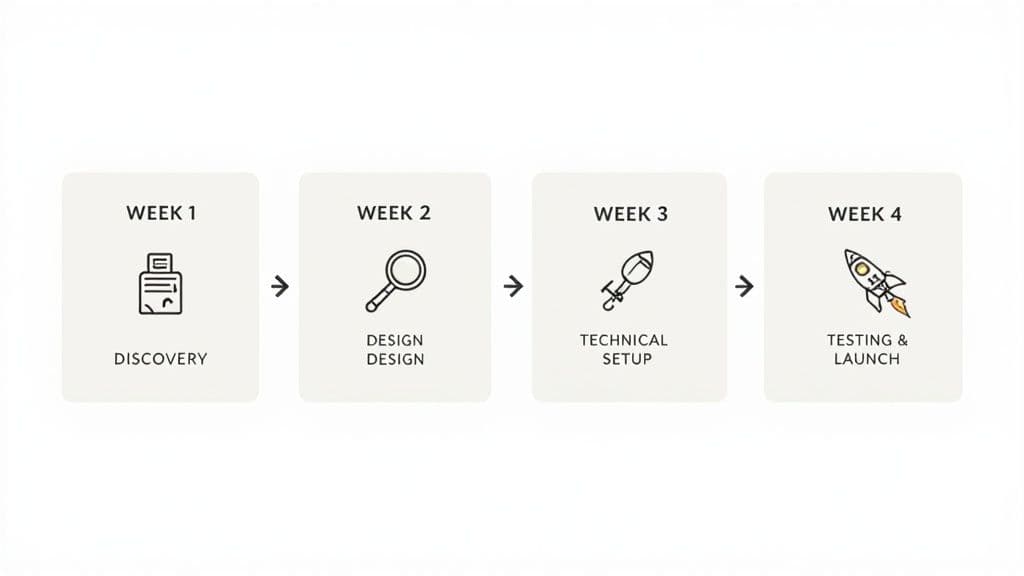
Week 1: Discovery and planning
The first week is all about finding your focus. Before you design a single conversation, you have to nail down the one big headache your chatbot will solve. Start by looking at your highest-volume, lowest-complexity HR questions. Is your team drowning in "how much PTO do I have?" tickets? Or is new hire onboarding eating up everyone's time?
Once you’ve zeroed in on the problem, map out how you handle it now. Document every single step, from the employee's first question to the final answer. This map is gold-it becomes the blueprint for your chatbot, ensuring you don't just automate a broken process.
- Key deliverables:
- A crystal-clear primary use case (e.g., "Answer all employee questions about the company dental plan").
- A visual map of the current manual workflow.
- A list of key stakeholders and a project kick-off meeting to get everyone aligned.
Week 2: Content and conversation design
With a clear goal set, week two is about giving the bot its brain and its personality. This means gathering all the accurate, up-to-date information your chatbot will need to be useful. Start pulling content from your employee handbook, intranet pages, and any FAQ docs you already have.
Next, you get to play screenwriter and design the conversational flows. Think about all the different ways an employee might ask a question. What follow-up info will the bot need to provide a complete answer? The goal is to keep the conversation simple, natural, and friendly.
A great chatbot conversation feels less like talking to a machine and more like messaging a helpful colleague. It should be direct, get to the point quickly, and always offer an easy way to escalate to a human if it gets stuck.
Week 3: Technical setup and integration
This is where the magic happens and your bot starts to take shape. In week three, you'll get into your chosen chatbot platform and start connecting the dots. For most modern tools, this is a low-code or no-code affair focused on configuration, not heavy engineering.
The most important step here is connecting the bot to your source of truth-usually, your HRIS. This is what unlocks the bot’s real power, letting it give personalized answers like checking an individual's remaining vacation days. You’ll also set up the bot in the places your employees already are, like Slack or Microsoft Teams.
Week 4: Testing and phased launch
You wouldn't launch a new feature without testing it, and your chatbot is no different. Before going live for the whole company, run it by a small pilot group. This group-usually a mix of HR team members and a few friendly, tech-savvy employees-will kick the tires and give you honest feedback. They’ll help you spot awkward phrasing, find knowledge gaps, and squash any bugs.
After you’ve polished the bot based on their input, you’re ready to launch. Start with a clear announcement that explains what the new bot does and how it makes life easier. A phased rollout, maybe department by department, is a smart way to manage the initial wave of questions and make sure your HR team is ready to support it.
Measuring success and avoiding common pitfalls
Getting your HR chatbot live is a huge milestone, but the real work starts now. The true value of this tool comes from constant tinkering and improvement, which means you need a sharp eye on what’s working and what isn’t.
Without clear metrics, your chatbot is just another line item in the budget. With them, it becomes a strategic asset you can fine-tune for maximum impact. This is how you turn a short-lived experiment into a core part of your HR strategy.
Defining your key performance indicators
To prove your chatbot is actually making a difference, you need to track the right key performance indicators (KPIs). These are the numbers that tell you if the bot is solving real problems, saving your team time, and making life easier for employees.
Don't get lost in a sea of data. Just focus on the metrics that tie directly back to the goals you set in the beginning.
Here are the essentials to start with:
- Resolution rate: What percentage of questions does the bot handle without needing to escalate to a human? A high rate-aim for 70-80%-is a great sign that your knowledge base is solid and your conversation flows are effective.
- User satisfaction (CSAT): After an interaction, just ask for a quick rating. A simple thumbs-up or thumbs-down is all you need to get a direct pulse on the employee experience.
- Task completion rate: If your bot handles concrete tasks like booking time off or updating personal information, track how many people actually finish the process. This tells you how useful it is in the real world.
- Adoption rate: Are people actually using it? Low adoption is a major red flag that you might have a visibility problem or a user experience issue that's turning people away.
Navigating common implementation pitfalls
Even the best-laid plans can hit a few bumps. The good news is that most chatbot implementation issues are predictable and, more importantly, preventable. Knowing what to watch out for from day one is the best defense.
The HR tech world is exploding, but adoption of AI tools still lags behind intent. According to a Forbes report, while a majority of companies plan to increase AI use, actual adoption rates are much lower. Why the gap? Often, it comes down to these avoidable mistakes. Discover more insights about HR tech adoption trends on biz4group.com.
For a deeper look, check out our guide on common AI implementation challenges.
Here are the top three traps and how to sidestep them:
- Poor conversation design: Nothing kills a chatbot faster than clunky, robotic dialogue. If it gets confused easily or leads users down dead ends, they’ll give up and never come back.
- How to fix it: Spend real time designing natural, intuitive conversation flows. Use simple, everyday language. Think ahead about common follow-up questions and always, always give users a clear and easy way to talk to a human if they need to.
- Lack of internal promotion: You can build the most brilliant chatbot in the world, but it’s useless if nobody knows it exists or what it’s for.
- How to fix it: Put together a simple launch plan. Give the bot a catchy name. Announce it on company-wide channels like Slack and be super clear about the specific problems it solves. Think: "Tired of digging for the PTO policy? Ask our new bot, [Bot Name]!"
- Failure to iterate: Treating your chatbot like a "set it and forget it" project is a guaranteed path to failure. Employee questions change, company policies get updated, and your bot needs to keep up.
- How to fix it: Make a habit of reviewing your chatbot’s analytics. Zero in on the questions it couldn’t answer and any interactions that got a low satisfaction score. That data is your roadmap for improvement. Use it to find knowledge gaps and refine your conversation flows every quarter.
By focusing on these KPIs and avoiding common mistakes, you can ensure your use of chatbots in HR delivers real, measurable value for years to come.
The single most important step is to just start. Pick one repetitive HR task, automate it with a simple chatbot, and build from there.
We at N² labs can help you identify the highest-impact use cases and build a chatbot that your employees will actually love to use.
FAQ
The price tag really depends on which path you take. Plug-and-play solutions can be anywhere from a few hundred to several thousand dollars a month, scaling with your company size and the features you need. Building one from scratch? That's a much bigger check to write, often starting in the tens of thousands of dollars. The key is to focus on the return on investment from hours saved and efficiency gained, not just the initial cost of the chatbot.
Absolutely-but only if you partner with a vendor who treats security as a non-negotiable foundation. Make sure any platform you consider is SOC 2 compliant, uses end-to-end encryption, and has rock-solid data privacy policies that align with regulations like GDPR. A thorough security audit is a deal-breaker when implementing chatbots in HR.
Not a chance. Chatbots are here to supercharge your HR team, not sideline them. Think of the bot as the ultimate assistant, expertly handling all the repetitive, high-volume questions that eat up your team's day. This frees up your HR pros to tackle the work that truly requires a human touch-things like complex employee relations, career pathing, and nurturing your company culture.
People will use a tool if it solves a real, painful problem for them. Don't try to boil the ocean. Launch your chatbot with a single, high-impact use case that everyone will appreciate, like getting instant answers to their PTO or benefits questions. A quick win builds immediate trust and shows its value from day one. Promote it internally and ensure there's an easy escalation path to a human.
The primary benefits are cost reduction, improved efficiency, and a better employee experience. By automating routine inquiries and tasks like onboarding and benefits questions, chatbots free up HR staff for strategic work. They provide employees with instant, 24/7 support, which increases satisfaction and reduces the administrative burden on your human resources department.